
Bits & Pieces has a fun collection of “double take” photos. Each one caused a fun moment of “huh?” in my mind, until reality snapped into place.
See the article here:
Fun gallery of “double take” photos
Bits & Pieces has a fun collection of “double take” photos. Each one caused a fun moment of “huh?” in my mind, until reality snapped into place.
See the article here:
Fun gallery of “double take” photos

Microsoft has been going into very exacting detail as to how Windows 8 works, but one area it hasn’t explored much is what happens before you even see the Start screen. As user experience manager Chris Clark notes, the days of mashing F8 repeatedly to reach a pre-boot configuration are (mostly) over: you can invoke it either through an “advanced startup” in settings, through Start menu shortcuts or, if your PC is truly sick, let it show automatically. At least on systems blessed with UEFI instead of an aging BIOS, you’ll get a lot more to tinker with as well, including going straight to the command prompt, recovering from a system image or booting from external storage. The emphasis on choosing your environment before you hit the power button is virtually necessary. A Windows 8 PC with a solid-state drive leaves just a 200-millisecond slice of time for any user input, and Microsoft would rather not have users caught in an infinite loop of restarting their systems as they unsuccessfully try to boot from USB drives. You’ll likely discover the pre-boot space first-hand when the OS ships later this year, but for now you can check the source for more.
Microsoft details Windows 8’s pre-boot world, helps you skip the F8 F8 F8 routine originally appeared on Engadget on Tue, 22 May 2012 23:09:00 EDT. Please see our terms for use of feeds.
Permalink |  MSDN Blogs | Email this | Comments
More:
Microsoft details Windows 8’s pre-boot world, helps you skip the F8 F8 F8 routine
Tuesday morning at 0344, right on schedule (and it had to be right on schedule), Elon Musk’s baby finally left the launch pad on its way to the International Space Station (ISS). Two babies, actually: the Falcon 9 launch vehicle is what we watched as it took off from Cape Canaveral — the first private spaceship headed for the ISS — with the Dragon spacecraft perched on its nose. The Dragon carried over 1000 pounds of supplies and experiments for the ISS. The launch went off without a hitch. But don’t stop holding your breath quite yet; Dragon isn’t scheduled to dock at the ISS until Friday.


Read more of this story at Slashdot.
See the article here:
At Long Last, a Private Cargo Spaceship Takes Off
Today is World Goth Day. Celebrate with the Sisters of Mercy.

Read the original:
Happy (Sad?) World Goth Day

Charitable entrepreneur Martha Lane Fox has teamed up with Microsoft, TalkTalk, and Simplify Digital to bring a cheaper option for cash-strapped folks in the UK. Starting today, you can buy a refurbished computer with broadband service for a year (with a 40GB monthly cap) for as little as £149 ($240) — and that price drops even lower for people on state benefits. The “Go On UK” initiative also throws in a WiFi router and Windows 7 to further spread that non-profit love around the nation — just like we have going on in the US.
Cheap £149 PC and broadband bundle gives the UK something to smile about originally appeared on Engadget on Tue, 22 May 2012 16:55:00 EDT. Please see our terms for use of feeds.
Permalink  The Telegraph | getonlineathome.org, go-on-uk.org | Email this | Comments
Excerpt from:
Cheap £149 PC and broadband bundle gives the UK something to smile about
CWmike writes “The maximum areal densities of hard disk drives are expected to more than double by 2016, according to IHS iSuppli. Hard drive company Seagate has also predicted a doubling of drive density, and now IHS iSuppli is confirming what the vendor community already knew. Leading the way for greater disk density will be technologies such as heat-assisted magnetic recording (HAMR), which Seagate patented in 2006. Seagate has already said it will be able to produce a 60TB 3.5-in. hard drive by 2016. Laptop drives could reach 10TB to 20TB in the same time frame, IHS iSuppli stated. It said areal densities are projected to climb to a maximum 1,800 Gbits per square inch per platter by 2016, up from 744 Gbits per square inch in 2011. Areal density equals bit density, or bits of information per inch of a track multiplied by tracks per inch on a drive platter. This year, hard drive areal densities are estimated to reach 780Gbits per square inch per platter, and then rise to 900Gbits per square inch next year.”
Read more of this story at Slashdot.
Visit link:
60TB Disk Drives Could Be a Reality In 2016

Smartphones have revolutionized how we communicate and the way we create, share and consume content. Yet there’s one aspect of using these devices that remains stuck in the last millennium, and that’s the calling experience — yes, apparently some people still make phone calls. Sure, there are plenty of VoIP and video calling apps out there, but few are simple and beautiful.
Enter Sidecar, a free app which aims to reinvent the way we make phone calls by adding messaging as well as real-time video, photo, location and contact sharing to that antiquated calling experience. It achieves this through an intuitive and polished user interface plus a handful of standards such as SIP and XMPP. Phone calls between Sidecar users are free anywhere in the world — the app even supports free WiFi calling to any number in the US or Canada.
While Sidecar’s been available in beta on Android for several weeks, it’s launching on iOS today with support for the iPhone and iPod touch. We’ve been using the app on and off for a few days on several handsets, including a Galaxy Nexus HSPA+ and an iPhone 4S and it works exactly as described. Looking for additional details? Check out the demo video and full PR after the break.
Gallery: Sidecar for iOS


Continue reading Sidecar comes out of beta, reinvents phone calls
Sidecar comes out of beta, reinvents phone calls originally appeared on Engadget on Tue, 22 May 2012 08:00:00 EDT. Please see our terms for use of feeds.
Permalink | Google Play store, iTunes Store | Email this | Comments
Read the article:
Sidecar comes out of beta, reinvents phone calls

Well this is rich. NBC Bay Area reports that Thomas Langenbach, identified as a VP at SAP‘s Palo Alto Integration and Certification Center, has been charged with four felony counts of burglary over ill-gotten LEGOs.
Authorities say the German software engineer generated his own fake bar codes, printed stickers with them, then slapped those cheaper bar codes over more expensive kits. And then, it is alleged, he sold that hugely-discounted LEGO loot on eBay for a profit.
Stealing and reselling LEGO on eBay is a thing! Back in 2005, Mark blogged about a guy from Reno, Nevada who pulled the same scam with phony DIY bar codes, and made off with $200K worth of stuff. Back in 2008, Boing Boing covered the story of a man in West Palm Beach, Florida who ripped off $42K worth with an even simpler method. And there are more similar cases.
From the NBC Bay Area report on the Silicon Valley SAP executive’s alleged crimes:
[Liz] Wylie, of Mountain View police, said Target security had captured Langenbach performing the “ticket switch” on camera, and had been onto him because the company pays very close attention to LEGO sales. “LEGOs are very popular and expensive,” Wylie said.
Langenbach was formally charged with four counts of burglary totaling seven boxes of LEGOs worth about $1,000.
When police searched his home, however, Hendrickson said they found “hundreds and hundreds” of LEGO boxes inside. They also discovered that since last April, he had allegedly sold 2,100 LEGO items totaling about $30,000 on eBay using the handle “tomsbrickyard.” Inside Langenbach’s car, Hendrickson said, were 32 pre-made barcode stickers.
A quick search on eBay shows that the “tomsbrickyard” account said to be Langenbach’s was a “Top Seller” with 99.9% positive reviews from buyers, and an eBay Feedback score of 1179.
Whatever the court ends up deciding about the man, his customers loved him.
Said one, “Excellent seller! Would definitely buy from again! A+++++”
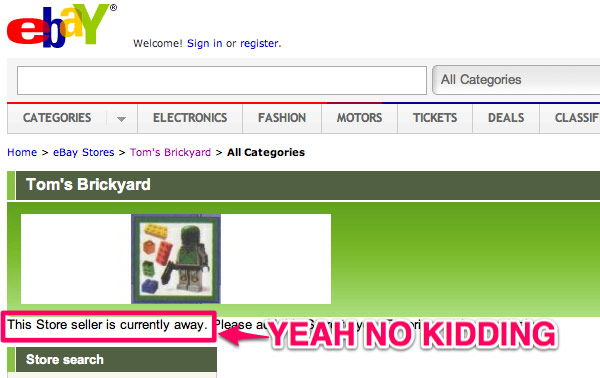
My favorite part of the report:
NBC Bay Area went to Langenbach’s multimillion dollar San Carlos home on Monday, but no one answered the door, despite people being home.
More: VP of Palo Alto’s SAP Arrested in LEGO Bar Code Scam.
(nbcbayarea.com via Andy Orin)
See original article:
SAP exec arrested for stealing $1K worth of LEGO with DIY bar code scam

If you’re a multitasking extraordinaire who depends on Windows as your primary computing platform of choice, there’s a good chance you utilize more than one monitor to get your work done — unfortunately, the seventh iteration of Microsoft’s OS didn’t offer as much support in this arena as most display warriors would prefer. The Consumer Preview of Windows 8 offered a few functionality improvements, and with its upcoming Release Preview, Microsoft is focusing on further enhancing the experience. Mark Yalovsky, a lead program manager on the User Experience team, put together a lengthy piece on what kind of goodies we can expect.
Among the highlighted changes is the ability to access the Start, app switching and charms menus from the corners on any monitor, rather than just having these options locked to only the primary display. The Release Preview also improves shared edges and corners so that the flow of cross-display navigation won’t get interrupted by obnoxious corners popping up when you don’t intend them to. Finally, the option of dragging and dropping Metro-style apps (as well as snapped apps) between monitors has also been included in the new build. These enhancements may seem small, but will go a long way toward appeasing those of us who can’t live without more than one screen. For the full listing of feature changes, view Microsoft’s video below and check out Mark’s post at the source.
Microsoft reveals more multi-monitor improvements in Windows 8 Release Preview (video) originally appeared on Engadget on Mon, 21 May 2012 13:06:00 EDT. Please see our terms for use of feeds.
Permalink | Microsoft | Email this | Comments
Visit link:
Microsoft reveals more multi-monitor improvements in Windows 8 Release Preview (video)

Microsoft is busting out version 1.5 of its Kinect for Windows runtime and SDK that includes a raft of new features for the Xbox-lacking hoi polli. The update includes 10-joint skeletal tracking that’ll work even when seated, face following capabilities and joint orientation — the latter enabling it to predict how your body will move for greater accuracy. It’s also gaining four extra languages for speech recognition: French, Spanish, Italian and Japanese, not to mention Kinect Studio, which will help developers record and play back your movements to fine-tune their applications. In addition, Redmond is offering language packs to ensure the sensor will play harmoniously with your local dialect, cobber.
Kinect for Windows SDK reaches v1.5, now works when you’re sitting down originally appeared on Engadget on Mon, 21 May 2012 11:53:00 EDT. Please see our terms for use of feeds.
Permalink | Windows Blog | Email this | Comments
See more here:
Kinect for Windows SDK reaches v1.5, now works when you’re sitting down