Nokia Lumia 900 Review: This One’s A No-Brainer

lumia 900-4

Short Version

Guys, this one’s such a no brainer that I shouldn’t even have to lay it all out. But I will.

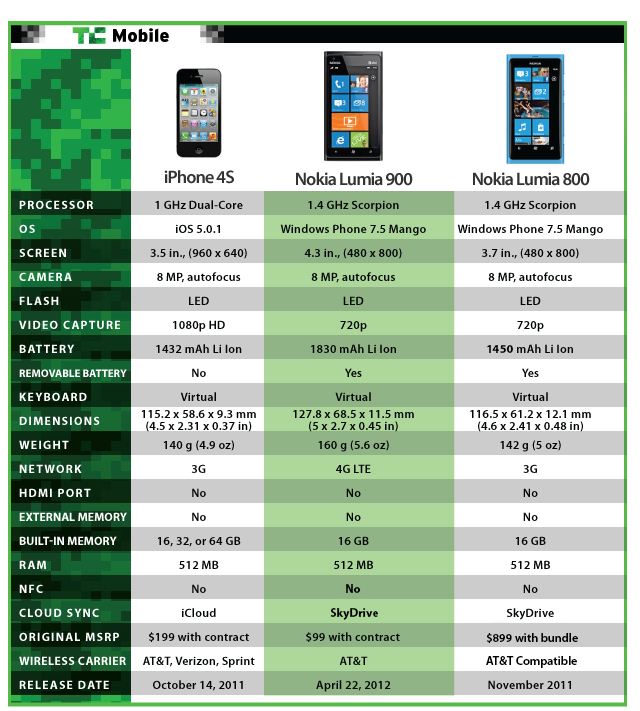
The Nokia Lumia 900 is an excellent handset, comes packed with a fresh new operating system in the form of Windows Phone 7.5 Mango, and thanks to a nifty AT&T bill credit from Nokia, you can essentially get this $100 LTE-equipped phone for free until the 21st. Repeat: for free.

Like I said, this one’s a no brainer.

Features:

  • 4.3-inch 480×800 AMOLED display
  • AT&T 4G LTE
  • Windows Phone 7.5 Mango
  • 1.4GHz single-core processor
  • 8MP rear camera (720p video capture)
  • 1MP front camera
  • MSRP: $100 on-contract (or free through April 21)

Pros:

  • Beautiful unibody polycarbonate casing (matte)
  • Well-built and premium feeling in the hand
  • Windows Phone is a refreshing joy to use

Cons:

  • Poor color reproduction on the camera
  • The display is a bit pixelated
  • If thin and light is your thing, this may feel clunky

Long Version

Hardware/Design:

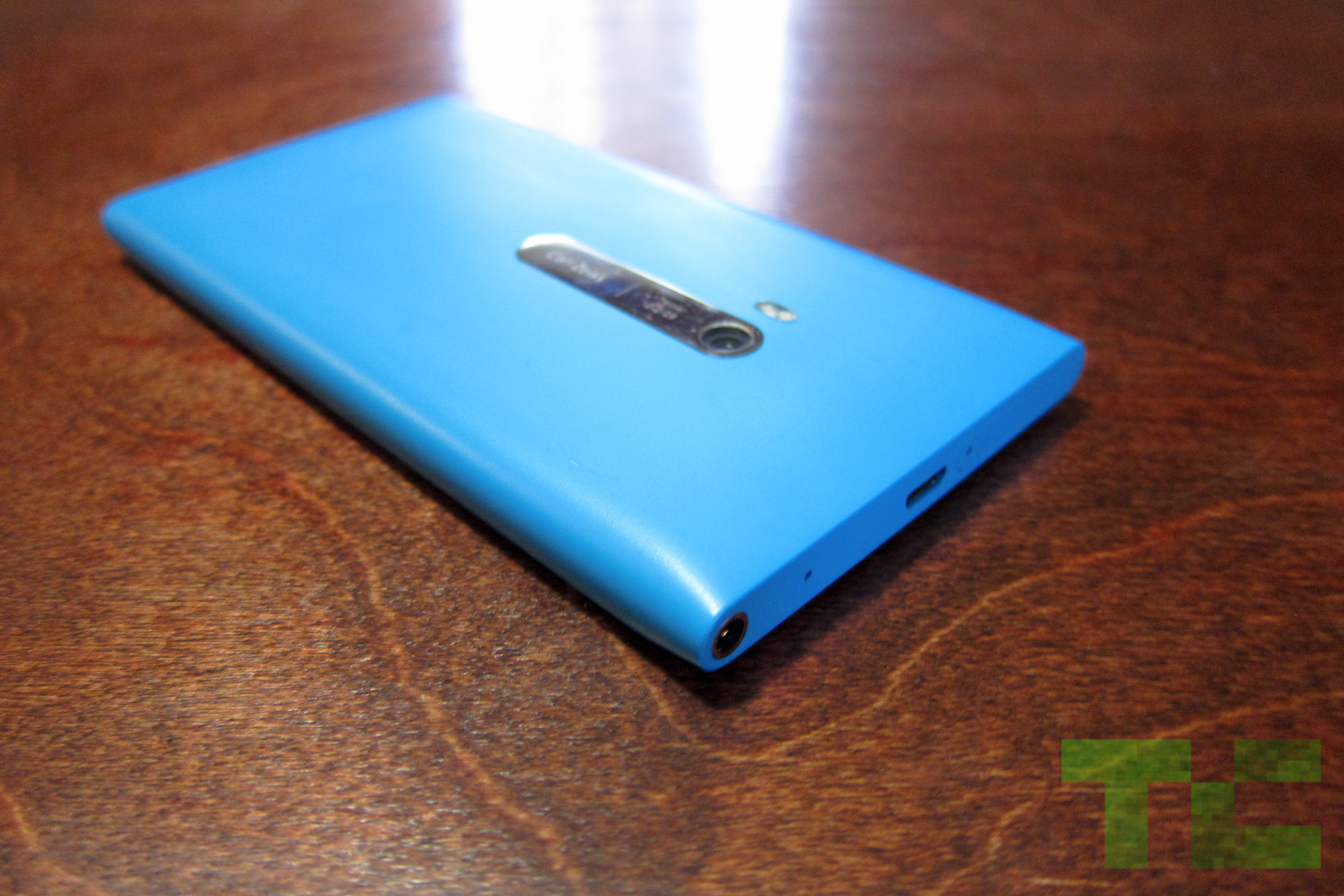
The hardware on the Lumia 900 is top-notch. Nokia truly stepped it up, which says quite a bit considering that well-built hardware is one of the Finnish company’s fortes. The weight distribution is balanced, which allows the Lumia 900 to stand up on its own should you place it on the table.

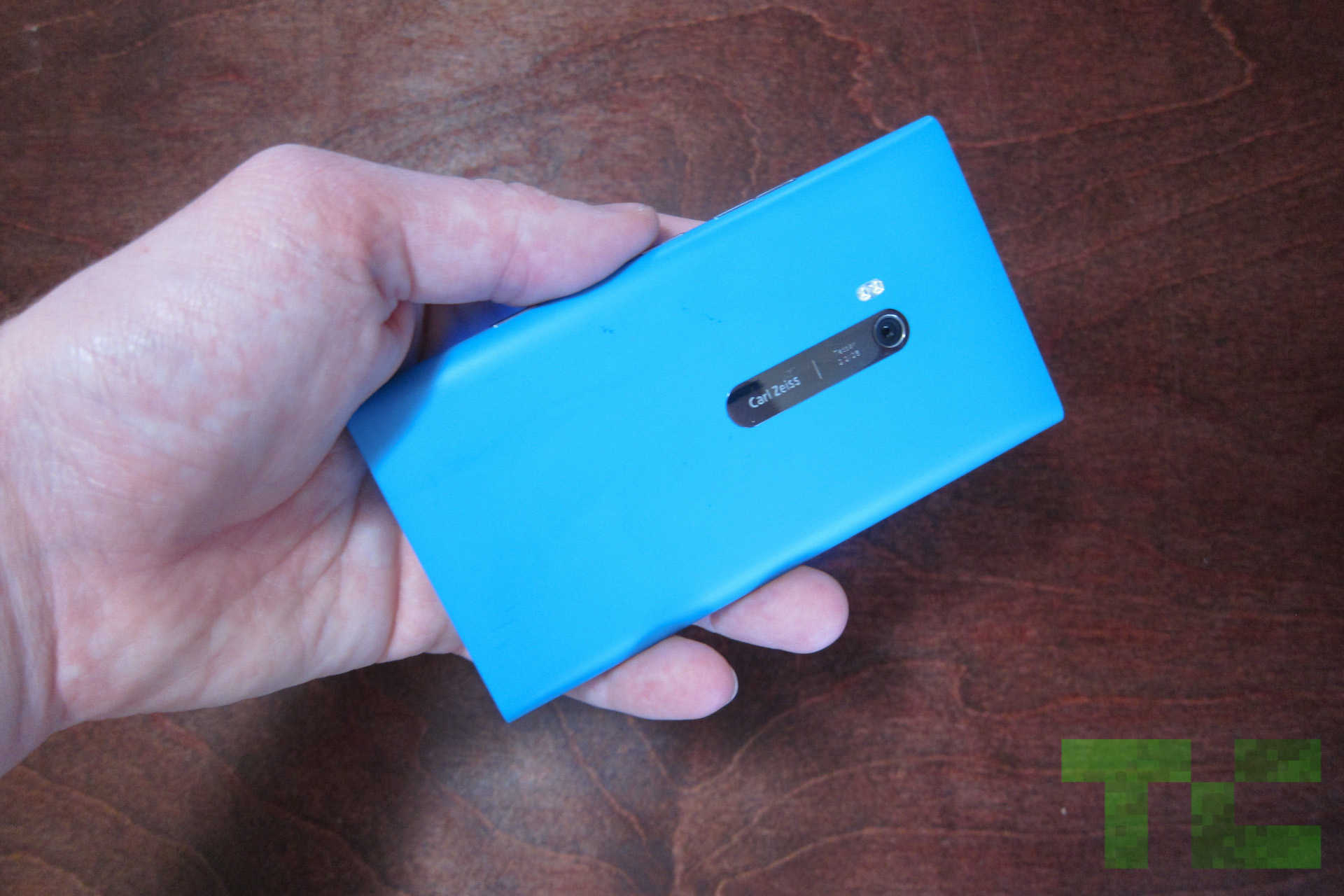
It has rounded edges along the side, with a flat top and bottom. The matte finish feels great in the hand, and Nokia actually built the phone with blue and black materials so even a deep scratch shouldn’t leave an ugly mark. The volume, camera, and lock buttons on my review unit felt a bit loose in their sockets, but I’m fairly certain that’s my only complaint.

Micro USB is square on the top of the phone, and it always bothers me when phone makers get in the way of playing games while plugged in (battery suffers most during gaming, so we plug a lot as we play at home), but at least the design is beautiful.

The battery isn’t removable, but battery life is better than expected on this little smurf so I don’t see it as a huge setback.

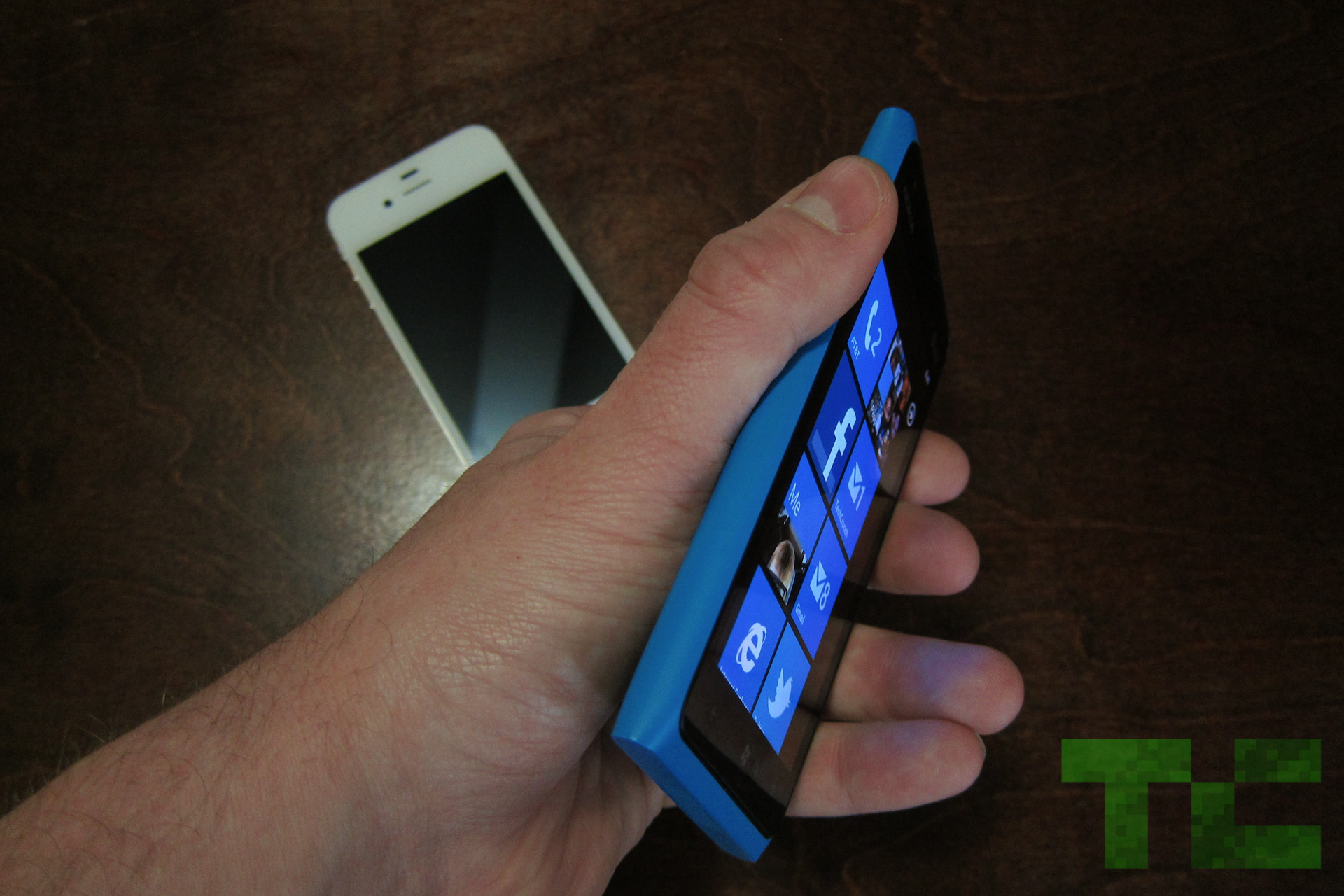
To be honest, the phone is a bit bulkier than most of its competition but I see this as a good thing. It’s not cumbersome by any means, and actually feels a bit more expensive than an LG Spectrum or any other super light, super thin phone.

Software:

I’ve got a thing for Windows Phone. I’m honestly not sure where it came from — I’ve never been a huge Microsoft user — but I feel lucky to have seen the light.

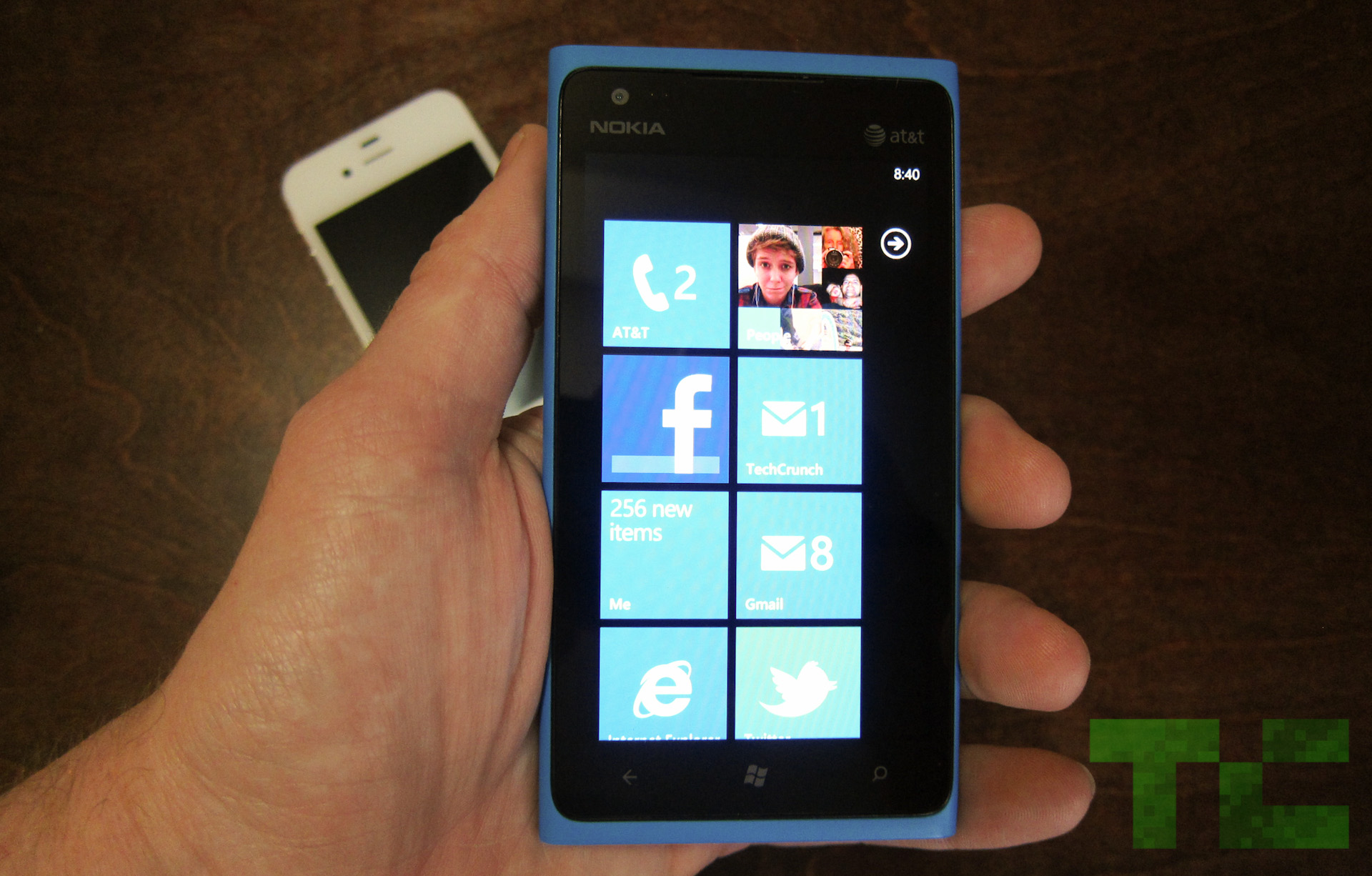
Now, there are inherent cons that come along with Windows Phone, for now. For example, you won’t find as many apps on the Marketplace as you would on Android or iOS (though that number is growing, and Microsoft is banking on quality over quantity). Another issue is locked-down specs, which happen to be just a bit outdated, that Windows Phone partners must abide by. One of those — the worst one, I feel — is a 480×800 display resolution, which bums me out on a 4.3-inch screen.

But, Microsoft is adding more high-res options with the launch of Apollo, though that won’t help you much with the Lumia 900.

But back to the point.

The baked-in features of Windows Phone are excellent. Threaded messaging is far and away my favorite, as it lets you conduct conversations with friends over a variety of formats (Facebook chat, text, Windows Live messenger) all from one unified stream. Local Scout, powered by Bing, is a welcome alternative to Yelp, and the People and Me hubs make me actually enjoy social networking. Of course, there’s still work to be done here, but if you haven’t given Windows Phone a chance I highly recommend checking out this emulator on your phone and seeing if you perchance have a crush on the new kid on the block.

Nokia also added some smart software to the phone including a contacts transfer app, which will help you transition from Android, iOS or BlackBerry.

Camera:

Now for a little bad news, if I may.

I love the UI of the camera app, to be sure, but the actual images produced by the Lumia 900 camera aren’t all that great.

Here’s what I’m noticing: When you open up the camera and look through the viewfinder, everything looks beautiful. Whatever you see in the viewfinder is almost identical to what you’re seeing in real life, in front of the lens. But once you snap the picture, the image produced instantly changes color. This happens most frequently on Auto, and adjusting the settings based on your environment will help this.

But the fact of the matter is, we take pictures quickly on our phones and don’t often want to mess around with settings unless we have the time. (None of us have the time.) Furthermore, some settings don’t quite match up with what you’d expect. White Balance in particular was a bit janky. That said, I wish color reproduction were a bit better.

On the other hand, I do like the physical shutter button on the side of the phone. It lets you half-press to focus, just as you would on an SLR, and then full-press to capture.

Video recording was smooth and I have no real complaints there.

Display:

Here’s the thing with this display. It’s the same exact size and resolution as the Galaxy S II (though the Lumia has an AMOLED display as opposed to a Super AMOLED Plus display), which was considered a beast for the past year. With the Galaxy S III on the horizon and 720p displays flooding the market, I’d be hard-pressed to recommend this phone to anyone who’s recently upgraded to a new super phone. In tech, it’s very difficult to go backwards.

At the same time, upgraders coming off of a one- to two-year-old phone shouldn’t have too much of a problem unless you’re really keen on display issues. Graphic artists and designers, for example, will surely notice the pixelated resolution. And Windows Phone only compounds that. It’s heavy on images, even on the home screen, and white text on a black background makes the resolution look even choppier.

However, one important win for the Lumia 900 display is its ClearBlack technology. I was able to use the phone in bright, direct sunlight (with my sunglasses on, mind you) and had absolutely no problem viewing everything on the display. I think this is a pretty big deal, since every phone I’ve ever used becomes really difficult to view in sunlight.

Performance:

It’s tough to measure the Lumia 900 against Android phones or the iPhone simply because any of the benchmarking we’d do would be irrelevant anyways — they’re different platforms. But I will tell you this: The Lumia 900, and specifically Windows Phone, is snappier than any Android phone I’ve ever played with.

Granted, animations and transitions are a half a second longer than they are on Android, but they’re beautiful and as a whole, the OS never shows any sort of lag. Pair that kind of speed with a little 4G LTE radio, and the Lumia 900 surely won’t disappoint in the performance department.

I’m also a big fan of the IE9 mobile browser in this bad boy. It’s quick like lightning, as proven by its BrowserMark score of 28769.

Battery:

Battery life on the Lumia 900 is actually quite impressive. In real-world scenarios the phone lasts through the entire day, even with 4G on the entire time. It seems like phone makers are finally figuring out what it takes to make 4G viable in the battery department, and we’re glad to see it.

As far as official testing goes, the Lumia 900 lasted a full five hours. Our testing includes a non-stop Google Image search — the phone never sleeps or rests from 100 percent green to death. At any point I can make a call, play a game, or browse the web, all of which I did with the Lumia.

To give you a little context, the Droid 4 only hung in there for three hours and forty-five minutes while the Droid RAZR Maxx (Motorola’s battery beast) stayed with me for a staggering eight hours and fifteen minutes.

Head-To-Head With The Lumia 800 and iPhone 4S:

Check out our thoughts on this match-up here.

Hands-On Video: Initial Impressions

Conclusion

My editors always tell me to close these reviews with a definitive stance, as I should, but this phone makes it difficult. I wouldn’t, and couldn’t, tell a smartphone enthusiast who’s been using a Galaxy Nexus or iPhone 4S to upgrade to this, simply because it wouldn’t be an upgrade. You’d notice the camera issues right off the bat, and the screen would probably bug you.

But this doesn’t make the Lumia 900 a bad phone at all. It’s a great phone. Nokia kicks ass at call reception, and while the specs are a bit outdated, hardware is beautiful and sturdy. As I said before, anyone coming off of a phone over a year old would be lucky to own a Lumia 900.

Especially for free.


Check out all of our Lumia 900 review posts here.

Continue Reading:
Nokia Lumia 900 Review: This One’s A No-Brainer

Logic gates made of live crabs


In Robust Soldier Crab Ball Gate, recently published in Complex Systems, a Japanese-UK computer science team describe how they made functional logic gates by constructing a maze of narrow tunnels and spooking soldier crabs into running through them in predictable ways by exposing them to bird-of-prey silhouettes. Lead researcher Yukio-Pegio Gunji (Kobe University) and colleagues implemented a “billiard ball computer” (a computer that implements logic gates out of chutes through which balls are dropped, either colliding or falling straight through) using the crabs, who have a repertoire of deterministic flocking responses to various stimuli, including narrow passages and the presence of predator shadows. The result is a relatively functional AND gate and a less-reliable OR gate. A Technical Review blog summarizes the method well:

When placed next to a wall, a leader will always follow the wall in a direction that can be controlled by shadowing the swarm from above to mimic to the presence of the predatory birds that eat the crabs.

Under these conditions, a swarm of crabs will follow a wall like a rolling billiard ball.

So what happens when two “crab balls” collide? According to Gunji and co’s experiments, the balls merge and continue in a direction that is the sum of their velocities.

What’s more, the behaviour is remarkably robust to noise, largely because the crab’s individuals behaviours generates noise that is indistinguishable from external noise. These creatures have evolved to cope with noise.

That immediately suggested a potential application in computing, say Gunji and co. If the balls of crabs behave like billiard balls, it should be straightforward to build a pattern of channels that act like a logic gate.

Computer Scientists Build Computer Using Swarms of Crabs

(via Wired)


Originally posted here:
Logic gates made of live crabs

1.5 million pages of ancient texts to be made accessible online


This week the University of Oxford and the Vatican announced a plan to collaborate in digitizing 1.5 million pages of rare and ancient texts, most dating from the 16th century or earlier. The project is expected to span about 4 years and was made possible by a donation of £2 million (approximately $3.1 million) from the Polonsky Foundation—a charitable organization that supports higher education, medical research, and other general matters in the arts and sciences.

Specifically, the texts will include pages from Oxford’s Bodelian Libraries and the Biblioteca Apostolica Vaticana (BAV). The digitized pages will include early printed books—called incunabula—from Rome and the surrounding area; Greek manuscripts including early church texts and works by Homer, Sophocles, Plato, Hippocrates; and Hebrew manuscripts from the Middle Ages and the Renaissance. “With approximately two-thirds of the material coming from the BAV and the remainder from the Bodleian, the digitization effort will also benefit scholars by uniting virtually materials that have been dispersed between the two collections over the centuries,” a statement from Oxford read.

The aim of the project, as envisioned by the Polonsky Foundation is “to democratize access to information, [seeing] increasing digital access to these two library collections, among the greatest in the world, as a significant step in sharing the wealth of resources on a global scale.” This is not the Polonsky Foundation’s first gift to digitize rare and ancient texts, either. An earlier gift to the Bodelian Libraries from the Foundation allowed the Oxford libraries to upload images of 280,000 fragments of Hebrew manuscripts, called the Cairo Genizah Collection, which are now available to search and view for free online.

Read the comments on this post


Continue Reading:
1.5 million pages of ancient texts to be made accessible online

New Targeted Mac OS X Trojan Requires No User Interaction


An anonymous reader writes “Another Mac OS X Trojan has been spotted in the wild; this one exploits Java vulnerabilities just like the Flashback Trojan. Also just like Flashback, this new Trojan requires no user interaction to infect your Apple Mac. Kaspersky refers to it as ‘Backdoor.OSX.SabPub.a’ while Sophos calls it at ‘SX/Sabpab-A.'”


Share on Google+

Read more of this story at Slashdot.

See the original post:
New Targeted Mac OS X Trojan Requires No User Interaction

More Malicious Apps Found On Google Play


suraj.sun writes “We’ve seen quite a few Android malware discoveries in the recent past, mostly on unofficial Android markets. There was a premium-rate SMS Trojan that not only sent costly SMS messages automatically, but also prevented users’ carriers from notifying them of the new charges, a massive Android malware campaign that may be responsible for duping as many as 5 million users, and an malware controlled via SMS. Ars Technica is now reporting another Android malware discovery made by McAfee researcher Carlos Castillo, this time on Google’s official app market, Google Play, even after Google announced back in early February that it has started scanning Android apps for malware. Two weeks ago, a separate set of researchers found malicious extensions in the Google Chrome Web Store that could gain complete control of users’ Facebook profiles. Quoting the article: ‘The repeated discoveries of malware hosted on Google servers underscore the darker side of a market that allows anyone to submit apps with few questions asked. Whatever critics may say about Apple’s App Store, which is significantly more selective about the titles it hosts, complaints about malware aren’t one of them.'”


Share on Google+

Read more of this story at Slashdot.

Read More:
More Malicious Apps Found On Google Play

Kickstarted “Pebble” E-Paper Watch Brings Puts Your Smartphone On Your Wrist

pebble1.jpgPebble is a fully customizable e-paper watch that interacts with your smartphone.

It’s hard to remember, but there was once a time, at least according to Dick Tracy, when we thought we might be speaking into our watches to communicate with each other. That vision of the future seemed to be a distant memory when cell phones came along.

Pebble, an e-paper watch, might just get us talking into our watches again. Brought to us by the same folks who developed the Blackberry-ready inPulse watch, Pebble is a fully customizable interface that syncs up with an iPhone or Android phone via Bluetooth. The 144×168 pixel display may be small but the device can stream plenty of data, with features to rival its smartphone ‘host organism.’ The developers suggest apps for exercise, among other things, where the e-paper provides a lighter display that is easier to read in bright sunlight. The watch can even interact with your phone’s caller ID or an mp3 player to control music over Bluetooth.

pebble2.jpg

But the killer app is that anyone can make an app, and that’s where the potential lies. Aside from what you can download from their watchapp store, you can create your own functions using if this then that or tap into the full SDK, using a familiar structure from Arduino and simple C. That means savvy developers can customize the four buttons, motor and accelerometer for any number of uses.

(more…)

Read the original post:
Kickstarted “Pebble” E-Paper Watch Brings Puts Your Smartphone On Your Wrist

MediaPortal 1.2.3 RELEASED!

We are very happy to present you this new release which is focused on increasing the stability of MediaPortal 1.2.

Some significant improvements include:

  • Updated versions of MediaInfo and sqlite. This should give increased stability.
  • Updates to TsReader.ax, which should give smoother TV playback.
  • Updates to TsWriter.ax which allow decoding of EPG data for DVB-T HD channels.

Full Changelog:

  • 0003738: [MediaPortal 1] Operand size mismatch in the ‘PresentImage’ callback parameters from dshowhelper to MP
  • 0003737: [MediaPortal 1] Video frame size change on TV channel change fails with some decode filters
  • 0003769: [general] Building MediaPortal in x64 environment fails
  • 0003804: [TV Full Screen] Under certain circumstances the wrong teletext subtitles are shown
  • 0003828: [Videos] Update sqlite to latest version
  • 0003827: [Videos] Update MediaInfo to 0.7.54
  • 0003733: [Music] Next track skin properties are not updated if playlist is changed
  • Continue Reading

Continue Reading:
MediaPortal 1.2.3 RELEASED!

Portugal Is Considering a "Terabyte Tax"


An anonymous reader writes “As a proposal to avoid becoming the ‘next Greece’, a Portuguese opposition party has proposed a tax on storage. The party claims that the tax will not effect the average citizen and is mostly levied at business users, but internal storage on mobile phones means a 64GB iPhone could be €32 more expensive. From the article: ‘The proposal would have consumers paying an extra €0.2 per gigabyte in tax, almost €21 extra per terabyte of data on hard drives. Devices with storage capacities in excess of 1TB would pay an aggravated tax of 2.5 cents per GB. That means a 2TB device will in fact pile on €51.2 in taxes alone (2.5 cents times 2048GB). External drives or “multimedia drives” as the proposed bill calls them, in capacities greater than 1TB, can be taxed to the tune of 5 cents per gigabyte, so in theory, a 2TB drive would cost an additional €103.2 per unit (5 cents times 2048GB).”


Share on Google+

Read more of this story at Slashdot.

Taken from:
Portugal Is Considering a "Terabyte Tax"

Everything You Need to Know About Intel’s Ivy Bridge [Video]

Intel is set to roll out its latest generation of processors this spring despite a minor setback affecting ultra low-voltage models — the ones destined for super slim notebooks. By normal standards, the launch should mark a new “tick” in the company’s product roadmap, but Intel is going beyond just shrinking the current 32nm Sandy Bridge processor by introducing some fundamental advancements along with its new 22nm process. More »

Visit link:
Everything You Need to Know About Intel’s Ivy Bridge [Video]