Uber launches UberPlus in LA for ‘balling on a budget’

In an appearance-obsessed city like Los Angeles , image, dahling , is everything. That’s why you can’t simply take a taxi between auditions, the juice bar and hanging out at your agent’s office. Your ride should be stylish , but thrifty, since an UberBlack would empty your bank account in the better part of a week. That’s why Uber is launching UberPlus, a service that slots in between Uber X and UberBlack and offers “balling on a budget.” Rather than rolling up in a Prius, you’ll have a pick of lower-level executive rides like a BMW 3 Series, C-Class Benz or an Audi A4. Even better, is that UberPlus’ minimum fee is just $5, $3 less than UberBlack, which is good, since the only thing standing between you and moving back home is the residuals from that vitamin infomercial. Filed under: Cellphones , Transportation Comments Via: Uber LA (Twitter) , Gizmodo Source: Uber

Read More:
Uber launches UberPlus in LA for ‘balling on a budget’

Apple announces iOS 8.1 with Apple Pay, iCloud Photo Library

Apple Pay is the most important thing to launch with iOS 8.1. Apple Apple has just released iOS 8.1, the first major update to iOS 8. The majority of the update’s new features have already been announced, but for one reason or another weren’t ready to be included in iOS 8 when it shipped last month . In the update, Apple plans to add back the “Camera Roll” album in iOS 8 with 8.1, to help users find their recently taken shots. The new version will also include a beta of iCloud Photo Library. iCloud Photo Library offers users the options of either backing up their photos to iCloud, or using it as primary storage to clear up space on their devices, only downloading photos when necessary. 8.1 will also mark the formal release Apple Pay, the contactless payment system Apple teased when it unveiled the iPhone 6 and 6 Plus in September. The new iPhones can store credit card data locally in what Apple calls the “Secure Element,” which also contains a Device Account Number unique to each phone. Stored cards can then be used to make purchases by using TouchID to authenticate and NFC to transmit the data. The Device Account Number and randomly generated per-transaction codes are used to obfuscate your credit card data, which isn’t exposed directly to retailers or to Apple. App developers can also integrate Apple Pay buttons into their apps to be used in lieu of credit card numbers. Apple stated that it plans to roll out Apple Pay in November. Read 1 remaining paragraphs | Comments

View article:
Apple announces iOS 8.1 with Apple Pay, iCloud Photo Library

Apple Pay launches Monday with support from Starbucks, Macy’s and others

Apple has just kicked off the iPad extravaganza with a big piece of news about its Apple Pay initiative. It’ll launch this Monday, and now has the support of 500 US banks along with major retailers like Starbucks, Macy’s, McDonald’s, Disney, Walgreens and Target. To remind you, Pay will make it possible to use your iPhone 6 and 6 Plus at the till (or online) instead of pulling out a credit card, since they’re the first Apple handsets with contactless NFC. It’ll work in conjunction with the Touch ID fingerprint scanner, and let you use any credit cards you’ve stored in Passbook . Meanwhile, the new iPhones’ Secure Element chip encryption is fenced off from iOS and iCloud, so that even Apple itself can’t see confidential purchase information. If you’re good with all that, you can give it a crack starting October 20th — a partial list of retailers is available here . Filed under: Cellphones , Tablets , Wireless , Apple Comments

See more here:
Apple Pay launches Monday with support from Starbucks, Macy’s and others

Android On Intel x86 Tablet Performance Explored: Things Are Improving

MojoKid writes: For the past few years, Intel has promised that its various low-power Atom-based processors would usher in a wave of low-cost Android and Windows mobile products that could compete with ARM-based solutions. And for years, we’ve seen no more than a trickle of hardware, often with limited availability. Now, that’s finally beginning to change. Intel’s Bay Trail and Merrifield SoCs are starting to show up more in full-featured, sub-$200 devices from major brands. One of the most interesting questions for would-be x86 buyers in the Android tablet space is whether to go with a Merrifield or Bay Trail Atom-based device. Merrifield is a dual-core chip without Hyper-Threading. Bay Trail is a quad-core variant and a graphics engine derived from Intel’s Ivy Bridge Core series CPUs. That GPU is the other significant difference between the two SoCs. With Bay Trail, Intel is still employing their own graphics solution, while Merrifield pairs a dual-core CPU with a PowerVR G6400 graphics core. So, what’s the experience of using a tablet running Android on x86 like these days? Pretty much like using an ARM-based Android tablet currently, and surprisingly good for any tablet in the $199 or less bracket. In fact, some of the low cost Intel/Android solutions out there currently from the likes of Acer, Dell, Asus, and Lenovo, all compete performance-wise pretty well versus the current generation of mainstream ARM-based Android tablets. Read more of this story at Slashdot.

Original post:
Android On Intel x86 Tablet Performance Explored: Things Are Improving

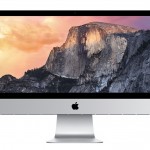
Apple reveals the 27-inch iMac with Retina Display starting at $2,499

A stable of new iPads wasn’t all Apple had up its sleeve today . The folks in Cupertino have also been hard at work on a desktop update, and the iMac is the beneficiary. If you’ll recall, Apple quietly trotted out a more affordable version of the machine back in June, but this fall’s release packs a much bigger punch. With the latest model, the company’s all-in-one option gets a boost in the screen department with the addition of a Retina panel. That 27-inch oxide TFT display is what Apple’s calling “Retina 5K, ” touting a 5, 120 x 2, 880 resolution with 67 percent more pixels than 4K. The added real estate means that you’ll be able to do things like edit 4K video in Final Cut Pro X while still having plenty of room for all the tools you’ll need. Even with all of that new screen power, the new iMac is said to be 30 percent more energy efficient. The outer edge is also 5mm thick, keeping the trim frame all the way around. As far as the internals go, there’s an quad-core 3.5GHz Intel Core i5 processor that can be upgraded to a 4GHz i7. There’s AMD Radeon R9 M290X graphics by default, 8GB RAM, 1TB Fusion Drive and Thunderbolt 2 ports that offer 20 Gbps transfers. For those who need more power, the new desktops can be equipped with your choice of up to 32GB of RAM, AMD Radeon R9 M295X graphics, a 3TB Fusion Drive and 1TB of PCIe flash storage. And of course, it’ll come with OS X Yosemite. The best part? You can hand over your funds for the iMac with Retina display starting today, and the base model is priced at $2, 499. If you’re not convinced that you need to splurge for that newfangled display tech, the existing 27-inch option is now $1, 799 and the 21.5-inch is $1, 099. Filed under: Desktops , Apple Comments Source: http://www.apple.com/imac-with-retina/

Link:
Apple reveals the 27-inch iMac with Retina Display starting at $2,499

The Mac Mini Is Back with Speedy New Guts

It’s been a long time, but the Mac Mini just got an update. It now has Intel’s Haswell processor which brings more computing power, better integrated graphics, and improved power efficiency. And now it starts at just $500. Read more…

See more here:
The Mac Mini Is Back with Speedy New Guts

OS X 10.10 Yosemite: The Ars Technica Review

Aurich Lawson / Thinkstock When the book is finally closed on the product line known as OS X, last year’s release of OS X 10.9 Mavericks may end up getting short shrift. Sure, it brought tangible energy saving benefits to Mac laptop owners, but such gains are quickly taken for granted; internal changes and new frameworks are not as memorable to customers as they may be to developers and technophiles. And while Mavericks included many new user-visible features , and even new bundled applications , the cumulative effect was that of a pleasant upgrade, not a blockbuster. But for all its timidity and awkwardness , Mavericks marked a turning point for OS X—and in more than just naming scheme . It was the first OS X release from the newly unified, post-Forstall Apple. If iOS 7 was the explosive release of Jony Ive’s pent-up software design ethos, then Mavericks was the embodiment of Craig Federighi’s patient engineering discipline. Or maybe Mavericks was just a victim of time constraints and priorities. Either way, in last year’s OS X release, Apple tore down the old . This year, finally, Apple is ready with the new. To signal the Mac’s newfound confidence, Apple has traded 10.9’s obscure surfing location for one of the best known and most beautiful national parks: Yosemite . The new OS’s headline feature is one that’s sure to make for a noteworthy chapter in the annals of OS X: an all-new user interface appearance. Of course, this change comes a year after iOS got its extreme makeover . Read 405 remaining paragraphs | Comments

Read More:
OS X 10.10 Yosemite: The Ars Technica Review

Apple Built A SIM Card That Lets You Switch Between AT&T, Sprint, And T-Mobile

 Whoaaa — here’s an interesting bit that went unmentioned in today’s Apple announcement: Apple has seemingly built a SIM card that lets you swap between AT&T, Sprint, and T-Mobile without having to swap it out (or, more likely, track down/purchase a new SIM card when you want to switch carriers). Read More

See more here:
Apple Built A SIM Card That Lets You Switch Between AT&T, Sprint, And T-Mobile

PS4 2.0: MP3s, themes and better dashboard organization

We’re creeping up to the PlayStation 4’s one year anniversary and the system is finally getting its 2.0 firmware update . Even better, there are a bunch of surprises; let’s dive in. First up we have the expected: SharePlay which lets you virtually pass the controller for help, YouTube exports and themes . A post PlayStation Blog notes that in addition to those, a USB music player, the ability to change colors of the PS4 dashboard (if custom themes aren’t your thing), as well as improvements to streaming are en route. There’s content organization, voice commands and, last but not least, a new backup feature that lets you archive all your settings, media and data to a USB device coming too. Like the Xbox One patch that hit this week , this adds a whole slew of features that ideally would have been available when the system launched last year. Join us after the jump for a breakdown, yeah? PS4 System Software 2.00 new features: http://t.co/sjlyHsde67 USB Music Player, broadcasting enhancements, more pic.twitter.com/ZwFbiJRKlN – PlayStation (@PlayStation) October 16, 2014 Sony came under some fire from fans when it was announced that the only way to listen to music on the PS4 was with a Music Unlimited subscription . That changes with this patch, though, and soon you’ll be able to plug in a USB device full of MP3, MP4, MP4A and 3GP files and listen to your heart’s content. The PS Blog says that music can’t be copied to the system’s hard drive, nor can it be used in conjunction with Music Unlimited. When we’ll see CD support is anyone’s guess, however. We’re betting that custom playlists won’t be available in-game either. Not happy with the theme pictured below? Well, you can opt for a handful of solid colors for the system UI like those at the bottom of this post. The patch also addresses a major gripe many have had with the system since launch: decluttering the system dashboard. Now the dashboard will only show the 15 most-used games and apps, with the rest going into the Library, which also is getting some new sorting options. What’s more, lets say you’ve been stocking up on the pretty great, free releases each month that are a part of your PS Plus subscription but you’re running out of storage on your console. Well, from the PlayStation Store you’ll be able to add them to your Library without downloading — perfect for grabbing stuff before it’s no longer free and saving for later, or once you install a bigger hard drive. Speaking of which, the 2.0 patch also adds the ability to back your system data, media and settings to a USB device. This should make transferring all the stuff you’ve accumulated over the past year to a roomier HDD a while lot faster and much more convenient if you’re living under a data cap. There’s a ton more than that, though! For the rest of the patch notes be sure to hit the PS Blog — sadly, however, it’s missing a release date. Filed under: Gaming , Home Entertainment , HD , Sony Comments Via: PlayStation (Twitter) Source: PlayStation Blog

See original article:
PS4 2.0: MP3s, themes and better dashboard organization