Anonymous sets sights on an old enemy—the Westboro Baptist Church

That link? It leads to a survey entitled, “Interactive Butthurt Report v. 2.0.” Nothing is beneath the Westboro Baptist Church, as evidenced by the group’s announcement to picket outside Sandy Hook Elementary School in wake of the recent tragedy. The group’s most recent, perhaps most deplorable decision has apparently irked one of its oldest enemies : infamous hacker collective Anonymous. In response to the WBC’s plans early today, Anonymous tweeted , “It’s so nice of #WBC to provide the internet with a list of their twitter handles…” Roughly one hour later, they revealed their plans for the WBC : “#WBC GodHatesFags Site Admin gets #DOX’d via: Anonymous.” DOX, of course, refers to the work Anonymous did to find and publish a list of WBC members complete with e-mails, phone numbers, and even home addresses—all for the adoring public to access. In addition to the DOXing, Anonymous has repeatedly promoted a whitehouse.org petition to have the WBC recognized legally as a hate-group . The petition was created on Friday and it has already doubled the required 25,000 signatures. Read 1 remaining paragraphs | Comments

Read More:
Anonymous sets sights on an old enemy—the Westboro Baptist Church

Huge Security Hole In Recent Samsung Devices

An anonymous reader writes “A huge security hole has been discovered in recent Samsung devices including phones like the Galaxy S2 and S3. It is possible for every user to obtain root due to a custom faulty memory device created by Samsung.” The problem affects phones with the Exynos System-on-Chip. Read more of this story at Slashdot.

More:
Huge Security Hole In Recent Samsung Devices

Using Windows 8’s “hidden” backup to clone and recover your whole PC

The blue screen of bringing your PC back to life. When it comes to backing up and restoring your PC, Windows 8 took a few steps forward and a few steps back. Your settings and apps in the new tablet-y interface (yeah, we’re still calling it Metro ) are automatically backed up if you use a Microsoft account. That means when you restore your PC, all of the Metro stuff comes back exactly the way you remember it. This has limitations—your desktop applications, anything that wasn’t downloaded from the Windows Store, are wiped when performing the most easily accessible type of restore in Windows 8. Beyond Metro, all you get is a file on your desktop listing the applications you’ve lost. There’s also a new backup tool on the desktop side of things, but this has its limits too. Called File History, it lets you automatically back up files to a network drive or cable-connected external hard drive every 10 minutes. As Peter Bright explained in an article last summer, File History’s arrival was paired with the exit of Shadow Copies. This was a useful tool that let users revert to previous versions of files without needing to connect an external drive, and now it’s gone. Read 20 remaining paragraphs | Comments

See original article:
Using Windows 8’s “hidden” backup to clone and recover your whole PC

Bunnie Huang is building a laptop

Virtuoso hardware hacker Bunnie Huang is building an open hardware laptop. Want. We started the design in June, and last week I got my first prototype motherboards, hot off the SMT line. It’s booting linux, and I’m currently grinding through the validation of all the sub-components. I thought I’d share the design progress with my readers. Of course, a feature of a build-it-yourself laptop is that all the design documentation is open, so others of sufficient skill and resources can also build it. The hardware and its sub-components are picked so as to make this the most practically open hardware laptop I could create using state of the art technology. You can download, without NDA, the datasheets for all the components, and key peripheral options are available so it’s possible to build a complete firmware from source with no opaque blobs. Building my Own Laptop

Read More:
Bunnie Huang is building a laptop

Rare Guinea Pig Hybrid Breeds

Behold the mighty guinea lion, a savage beast that kills with the power of cuteness. Adventurous animal lovers will discover many more examples of guinea pig-animal hybridization at the link below, but don’t let their adorability fool you- these cuties are packing a mean set of chompers! Link

Follow this link:
Rare Guinea Pig Hybrid Breeds

Linux to drop i386 support in the 3.8 kernel, make us upgrade our Doom rig

Linux has developed a reputation for running on just about anything . If proposed changes to the 3.8 kernel take effect, we’ll have to add an “almost” disclaimer. The OS’ maintainers expect to drop support for Intel’s i386 architecture with the new release, noting that there’s “quite a bit of complexity” that could be lifted by swinging the focus to (much) newer chips. Don’t expect Torvalds to have much nostalgia for i386 despite basing much of his early work on it, either, as he’s bidding “good riddance” to the legacy code. We can’t blame the Linux collective for wanting to drop support for 27-year-old silicon that’s well out of fashion, even in embedded components; you’ll just have to forgive us if we shed a tear for that retro gaming PC which finally fell off the update bandwagon. [Image credit: Konstantin Lanzet, Wikipedia ] Filed under: Software Comments Via: ZDNet , Extremetech Source: Kernel.org , Gmane.org

Excerpt from:
Linux to drop i386 support in the 3.8 kernel, make us upgrade our Doom rig

Google phasing out ActiveSync push mail for free customers

Calling it “Winter cleaning,” Google has announced that from January 30, 2013, users of Google Mail, Calendar, and Contacts will no longer receive Exchange ActiveSync (EAS) support on their accounts. EAS provides push mail and synchronization of contacts and calendars to a number of mobile platforms, including iOS, Symbian, and Windows Phone. It’s also one of the protocols that Windows 8’s Metro Mail app uses, as does Outlook 2013. Currently, users of Google’s services can enable EAS support to use their Google accounts with suitable devices. After the cut off, existing users will continue to be able to use EAS with their devices, but those users won’t be able to add new devices. All future devices will have to use IMAP for their mail, CalDAV for calendar sync, and CardDAV for contact sync. Android and iOS users can use these protocols, but many others will be left high and dry. Push mail, in particular, could be left behind, as many platforms (including iOS) don’t support the IMAP IDLE push mail feature. Read 4 remaining paragraphs | Comments

Originally posted here:
Google phasing out ActiveSync push mail for free customers

Google shuts down features and services for ‘winter cleaning’

Seasons change and web services shut down — such in life. Google today announced some “difficult decisions” regarding a number of properties, particularly Calendar, which will see the end of several “less popular” features on the 4th of next month. On the list of blacked out capabilities are the ability to make reservable times through the service’s Appointment slots. Smart Rescheduler and Add Gadget by URL are also set to go black on that date, while the ability to check one’s calendar and create events via SMS are coming to an end today. On January 30th, meanwhile, it will no longer be possible to set up new devices with Google Sync. That date also marks the end of Google Sync for Nokia S60 and SyncML — and today, the company’s discontinuing Google Calendar Sync. Also on the chopping block are Google’s Issue Tracker API and Punchd. More info on all the shutdowns can be found in the source link. Filed under: Internet , Software , Google Comments Via: The Next Web Source: The Official Google Blog

Read the original:
Google shuts down features and services for ‘winter cleaning’

Acer Iconia W700 review: a Core i5 Windows 8 slate that doesn’t skimp on battery life

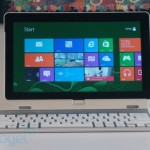
Until PC makers figure out what consumers want in their Windows 8 PCs, they’ll be throwing different designs at the proverbial wall to see what sticks. One thing’s for sure, though: laptop / tablet hybrids have already made it. So far, we’ve seen a mix of models, some with low-power Atom processors, and others with laptop-grade Core i5 CPUs inside. Basically, a choice between amazing horsepower and long battery life. In Acer’s lineup, specifically, we’ve already had a chance to play with the Iconia W510 , an Atom-powered device with a keyboard dock. Now we’re taking a look at the Iconia W700 ($800 and up), an 11-inch tablet that’s essentially an Ultrabook with no keyboard attached. Based on that brief summary you’d think it had the same form factor as the smaller W510, but you’d be wrong. Whereas the W510 has a keyboard dock with a built-in battery, the W700 has a cradle with a modular kickstand you can use you to prop up the tablet in landscape or portrait mode. There’s no battery inside the dock, and the keyboard is a standalone product; you’ll have to pack it separately if you decide you need it on a trip. So is there any advantage to having a design with so many different pieces? And how does that Core i5 processor fare, anyway? Let’s see. Gallery: Acer Iconia W700 review Continue reading Acer Iconia W700 review: a Core i5 Windows 8 slate that doesn’t skimp on battery life Filed under: Laptops , Tablets , Acer Comments

Visit site:
Acer Iconia W700 review: a Core i5 Windows 8 slate that doesn’t skimp on battery life

How to bring down mission-critical GPS networks with $2,500

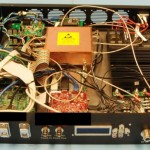
Enlarge / The phase-coherent signal synthesizer with its top cover removed. The $2,500 device can be used to severely disrupt mission-critical GPS equipment used by the military and private industry. Nighswander et al. Scientists have devised a series of novel and inexpensive attacks that can severely disrupt mission-critical global positioning systems relied on by the military and a variety of industrial players, including airlines, mining companies, and operators of hydroelectric plants and other critical infrastructure. Unlike previous GPS attacks, the one developed by a team of scientists from Carnegie Mellon University and a private navigation company exploits software bugs in the underlying receivers. That allows the attacks to be stealthier and more persistent than earlier exploits, which primarily relied on signal jamming and spoofing. Prototype hardware that cost only $2,500 to build is able to cause a wide variety of GPS devices within a 30 mile radius to malfunction. Because many of those devices are nodes on special networks that make GPS signals more precise, the attacks have the effect of disrupting larger systems used in aviation, military, and critical infrastructure. The PCSS, or phase-coherent signal synthesizer, that they developed simultaneously receives and transmits civil GPS signals. It carries out many of the same things done by spoofers used in earlier GPS attacks. But instead of merely providing false information designed to compromise the accuracy of the GPS readings, it includes data that exploits weaknesses in the firmware of nearby receivers, many of which use the Internet to share their readings with other machines. The success of the PCSS is the result of an almost complete lack of authentication in the devices that send and receive GPS signals. Read 11 remaining paragraphs | Comments

View article:
How to bring down mission-critical GPS networks with $2,500