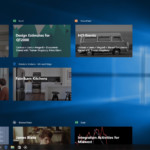
One of the more intriguing features Microsoft will include in this fall’s Windows 10 Creators Update is Timeline. As the name suggests, it’s a way for you to move backwards in time and see things you were working on in the past and resume what you were doing. Microsoft described it as a visual timeline of everything you were doing on your computer, and you can jump back into files, applications and websites where you left off. Introducing Timeline. Easily jump back in time to continue where you left off. #Windows10 #MSBuild pic.twitter.com/e3gxhXnp6W — Windows (@Windows) May 11, 2017 Timeline lives in the Windows app switcher. When you click it, you’ll see your active apps, but below that you’ll see what you were running earlier in the day. Clicking down on one of those things that you were using earlier will pop it open just as you were using it before. This works across multiple devices, as well — when you open up another Windows device where you’re signed in, you can resume the tasks you were using before. This will even work across other devices like an iPhone using the Cortana app. If you’re somewhere where you have Cortana, it’ll prompt you to continue working on whatever you were doing before. If you don’t have the specific app installed on your phone, it’ll help point you to the right app as well. At first glance, it sounds a little bit like the Time Machine backup feature that Apple has included in macOS for years now. But Time Machine is more of a file backup system that lets you go back and see earlier versions of files that you might want to restore. Microsoft’s Timeline covers applications and websites as well as just files, and it doesn’t require an external hard drive, as it’s not really a true backup system in the way Time Machine is. Indeed, Timeline appears more like Microsoft’s answer to Continuity, a feature Apple build into macOS and iOS that lets you pick up and resume work across whatever Apple device you’re using. Timeline is just one feature in the forthcoming Creators Update, which features a host of tools for using Microsoft’s software and services across devices. The “Microsoft Graph” set of APIs will let you pick up and continue work across multiple devices and will iOS and Android as well as Windows. It’ll also let you have a “universal clipboard” across your devices. Click here to catch up on the latest news from Microsoft Build 2017.
See more here:
Windows 10 Timeline remembers everything you did on your PC
 New submitter troublemaker_23 quotes a report from ITWire: Only 36% of software engineers in India can write compilable code based on measurements by an automated tool that is used across the world, the Indian skills assessment company Aspiring Minds says in a report. The report is based on a sample of 36, 800 from more than 500 colleges across India. Aspiring Minds said it used the automated tool Automata which is a 60-minute test taken in a compiler integrated environment and rates candidates on programming ability, programming practices, run-time complexity and test case coverage. It uses advanced artificial intelligence technology to automatically grade programming skills. “We find that out of the two problems given per candidate, only 14% engineers are able to write compilable codes for both and only 22% write compilable code for exactly one problem, ” the study said. It further found that of the test subjects only 14.67% were employable by an IT services company. When it came to writing fully functional code using the best practices for efficiency and writing, only 2.21% of the engineers studied made the grade. Read more of this story at Slashdot.