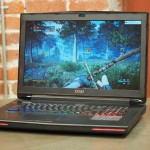
The last time I saw MSI’s Dominator laptop, I was sick of it . There wasn’t anything wrong with it, but at the time, the product name belonged to the GT70: a powerhouse gaming machine that hasn’t evolved much since its introduction in 2012. Back then, I loved the machine’s heavy chassis, superb keyboard and excellent sound — but over time, the machine’s aesthetic trappings began to bore me. Someone at MSI must have felt the same way: Earlier this year, the company released the GT72, a new Dominator with a whole new design. Soon after, it relaunched the machine with NVIDIA’s latest graphics architecture . OK, MSI, let’s see if you can make me fall in love again. Look and feel On a conceptual level, the new Dominator isn’t all that different from its predecessors : It still features a large 17-inch display and a wide, heavy chassis, plus enough power to make the average gaming laptop blush. Still, its design feels less dated. It’s a study in matte black aluminum with few visual flourishes. The front edge (and the top of the screen lid) comes to a wide-pointed peak with red accents and a subtle crimson paint peers out from behind the speaker grille. LED lighting behind the keyboard adds a little optional color, but overall the Dominator doesn’t overdo it in the aesthetics department, and that’s a good thing. The GT72 still fits the overbearing profile of a 17-inch gaming laptop, but it is a little smaller than the previous Dominator. The new design’s 16.85 x 11.57 x 1.89-inch frame is noticeably thinner than the GT70’s 2.17-inch chassis. It still weighs a solid 8.33 pounds, but at least it makes good use of its size: Four USB 3.0 ports run down the left side of its frame, accompanied by a quartet of audio jacks and an SD card reader. Two more USB connections and an optical drive live on the right edge of the machine, followed by all the other usual suspects on the rear: a power adapter, Ethernet jack, HDMI output and two DisplayPort plugs, just in case you want to rock a three-monitor setup. MSI’s original Dominator featured a parade of physical media keys that lived just north of the keyboard. This switchboard went through a handful of overhauls as the years went on, crowding the edge of the chassis with WiFi toggles, disc-eject buttons, brightness controls and other unnecessary redundancies. The GT72’s control deck is simpler. Five buttons run down the left edge of the machine’s keyboard, and they’re all useful. There’s a power key, of course, but also a button that switches between discrete and integrated graphics (this requires a reboot); a “cooler boost” fan overdrive mode; a shortcut that launches the Dominator’s game-streaming software; and a keyboard backlight toggle. Keyboard and trackpad Speaking of the keyboard, I’m happy to report that MSI is still using SteelSeries to power its backlit keys. It’s a physically satisfying keyboard, with simple, island-style key caps that fall with a short, but soft depression. Even so, most of its magic happens behind the scenes. The included SteelSeries Engine software suite allows the user to create custom macros, and then program those macros to any button on the keyboard’s surface, effectively making it a 100 percent reprogrammable typewriter. You can also customize the backlight with countless color combinations and even create statistical reports that highlight which keys are used most frequently during a timed play session. Useful features if you want them, but invisible if you don’t. I can’t ask for much more. Technically speaking, there isn’t anything wrong with the GT72’s touchpad. Its large, smooth surface accurately reads my finger’s movements and translates them into the exact on-screen action I intended to execute. Its physical buttons depress with a satisfying, tactile response. The pad’s boundaries are defined by a thin LED glow that nicely matches the backlight of the machine’s keyboard — but still, I don’t like it. It’s an issue of form versus function. While technically functional, visually appealing and objectively fine, the Dominator’s pad is impossible to locate by feel alone. It’s not just flush with the palm rest; its surface is the surface of the palm rest. I accidentally dragged my finger off of the touch surface on multiple occasions while using the Dominator, and it was frustrating every single time. Display and audio Large, gorgeous displays are the saving grace of most oversized gaming laptops, and the Dominator has never been an exception to that rule. The GT72’s screen is a strong LCD with few caveats. Sharp visuals and vibrant colors are the standard here. Games look great; Blu-ray discs are a joy to watch; and there’s very little to complain about. If I were to nitpick, I’d say that it loses contrast if you view it from harsh, impractically low angles, but that’s true of most displays. The Dominator series has a history of offering great audio, and that tradition lives on with the GT72. Like its predecessors, this machine boasts Dynaudio speakers and, as always, they sound great. Loud, clear sound pumps from the laptop’s speaker bar. It’s among the best audio you can get on a laptop without plugging in a pair of headphones. The machine’s sound is augmented by Sound Blaster Cinema software as well, with distinct modes for gaming, music, cinema and voice. That said, you won’t need to touch it: The GT72’s equalizer pretty much manages itself. Performance and battery life PCMark7 PCMark Vantage 3DMark06 3DMark11 ATTO (top disk speeds) GT72 Dominator (2.5GHz Core i7-4710HQ CPU, NVIDIA GTX 980M 8GB) 6, 319 21, 593 29, 707 E13, 867 / P10, 734 / X4, 203 533 MB/s (reads); 323 MB/s (writes) ASUS ROG G751 (2.5GHz Core i7-4710HQ CPU, NVIDIA GTX 980M 4GB) 6, 191 23, 861 29, 752 E14, 516 / P11, 304 / X4, 304 1.06 GB/s (reads); 775 MB/s (writes) GT70 Dominator (2.7GHz Core i7-4800MQ CPU, NVIDIA GTX 880M 8GB) 6, 308 23, 431 27, 775 E11, 433 / P8, 344 / X2, 877 1.4 GB/s (reads); 498 MB/s (writes) Razer Blade 14-inch (2.2GHz Core i7-4702HQ, NVIDIA GTX 870M 3GB) 5, 664 19, 994 24, 255 E9, 533 / P6, 541 / X2, 236 542 MB/s (reads); 257 MB/s (writes) MSI GS60 Ghost (2.4GHz Core i7-4700HQ, NVIDIA GTX 860M 2GB) 5, 909 22, 602 22, 898 E7, 908, / P5, 152 / X1, 519 537 MB/s (reads); 495 MB/s (writes) Alienware 14 (2.4GHz Core i7-4700MQ, NVIDIA GTX 765M 2GB) 5, 310 21, 502 20, 868 E6, 529 / P4, 211 507 MB/s (reads); 418 MB/s (writes) Alienware 17 (2.7GHz Core i7-4800MQ, NVIDIA GeForce GTX 780M 4GB) 5, 647 22, 114 27, 137 E10, 638 / P7, 246 509 MB/s (reads); 420 MB/s (writes) So far, we’ve seen that the GT72 has stayed consistent with every other machine that bears the name “Dominator”: It has great audio chops, a comfortable keyboard, solid build quality and a screen worthy of almost any media you’d want to watch on it. Is it ridiculously powerful, too? Of course it is. The spec list for my $2, 400 review unit is practically a cheat sheet for building an overwhelmingly powerful mobile gaming rig: a 2.5GHz (3.5GHz with Turbo Boost) Intel Core i7-4710HQ CPU, 16GB of DDR3L RAM, a 128GB boot drive, a second 1TB drive for game installs and NVIDIA’s latest GPU — an 8GB GeForce GTX 980M. It’s not even MSI’s most tricked-out configuration, but it’s close — and has more than enough power to shrug off anything my game library could throw at it. Fancy yourself a round of Battlefield 4 ? You’ll be clocking over 100 frames per second on ultra high visual settings if you turn V-Sync off. More of a Call of Duty fan? No problem: Advanced Warfare runs at a steady 81 fps on “extra” detail with 2x supersampling enabled. Not everything I played pushed triple digits, but I couldn’t find a single game that didn’t run at a respectable clip. Maxing out the visuals in Titanfall will run the game at 44 fps, but you can easily kick that above 60 fps by tweaking the anti-aliasing settings. The Witcher 2 , meanwhile, racked up 38 fps on ultra with Ubersampling enabled (and 90 fps without). The only game that stuttered was Ryse , which actually ran at 57 fps on its maximum default settings, but sometimes fell into the low 20s with supersampling turned on. This kind of performance usually turns laptops into PC gaming hotplates, but the GT72 actually stays fairly cool under pressure. It took almost 20 minutes of fast-paced multiplayer action before I felt the heat of the Dominator’s frame on my lap, and it never reached the point where I was uncomfortable. Turning the machine’s “cooler boost” function on will kick its internal fans into overdrive and drive the temperature down a bit further, too. I never reached a point where I needed to use this feature, but I often did anyway: A cool laptop is a happy laptop. Battery life MSI GT72 Dominator 3:09 (discrete GPU) 4:38 (integrated GPU) Razer Blade 14-inch 6:24 MSI GT70 Dragon Edition 4:34 Razer Blade (2014) 4:27 Razer Edge Pro 3:40 ASUS ROG G751 3:40 Razer Blade 2.0 3:29 MSI GT70 Dominator (2014) 3:21 MSI GS60 Ghost 3:13 Alienware 14 3:07 Alienware 17 2:55 At first blush, the GT72 Dominator Pro seems to have short run time: Our standard video-looping test drained the battery in just three hours. That’s a mediocre showing for a high-end gaming laptop with a beefy GPU — and not nearly enough to justify using the rig more than six feet away from a wall outlet. Fortunately, better battery life is just a reboot away: Pressing the Dominator’s dedicated GPU-switch button (on the left) puts an integrated Intel HD Graphics 4600 in charge of visuals. It won’t be able to play games until you switch back to the discrete NVIDIA GPU, but now the machine can run for over four and a half hours unplugged. Perfect for web browsing and general computing tasks. Software There’s nothing better than booting up a new laptop to a blank, unmolested installation of Windows. It’s satisfying — no bloatware, no trial software to uninstall and no garbage apps — but it’s not an experience you’ll get with the GT72 Dominator. The machine certainly isn’t the worst offender in terms of pack-in software, but an advertisement to activate (read: purchase) Norton Security will never be the first thing I want to see when I start a new machine for the first time (and no, Norton, I don’t really want to get my “Norton Toolbar” back either). Most of the software here isn’t too bad. NVIDIA’s GeForce Experience is naturally installed as part of the GPU’s software suite and there are applications for controlling the keyboard backlight, macro keys and an MSI-sourced app to track system performance, temperature and hotkeys. There’s also a six-month trial of XSplit Gamecaster. Normally, a game-streaming trial wouldn’t bother me, but the GT72 has a hardware button dedicated to that trial software. If you don’t buy it, that button loses its utility. That’s awful. Configuration options and the competition The $2, 400 GT72 2QE I’m reviewing here (Intel Core i7-4710HQ, NVIDIA GTX 980M graphics and 16GB of RAM) isn’t the most expensive Dominator MSI offers, but it’s not that different from the product’s higher-end configurations either. Adding $250 will score you an additional 8GB of RAM and a pair of 128GB SSDs arranged in a RAID 0 configuration (that’s 256GB of combined space). Another $350 (for a total price of $3, 000) will double that SSD boot disc again and bring you to 32GB of RAM. If you’re looking for a little more power or a slightly smaller price tag, you’ve got options there too: MSI sells a $3, 400 variant with a 2.8GHz Intel Core i7-4980HQ CPU, and will upgrade the SSD storage to a full terabyte for an additional $500. Alternatively, you could pay as little as $2, 000 for a Dominator more closely matching our review unit, but you’ll have to settle for a downgraded 6GB NVIDIA GTX 970M GPU and only 12GB of RAM. Still not what you want? Search around: Sites like iBuyPower can tweak and customize the rig beyond MSI’s stock configurations. As always, there are plenty of alternative PC gaming powerhouses available if you know where to look. Folks into MSI, but not sold on the GT72’s new chassis may want to look at the GS60 Ghost — it can be built to match the GT72’s lower-end configuration in both price and specifications, but is somehow less than an inch thick. Last year’s Dominator might be a compelling option too: The GT70’s design may be outdated and its internals may represent the best of last year, but it’ll still run almost anything you throw at it (and cost hundreds less, to boot). Looking for NVIDIA’s latest GPU from a different manufacture? It can be done, but you’ll have to walk off the beaten path. GTX GeForce 970M and 980M equipped-laptops can be had from Maingear, AVADirect, Gigabyte and Digital Storm in dozens of configurations — from the modestly priced $1, 600 Clevo P150SM-A to Digital Storm’s $4, 021 Behemoth . If you’re willing to put in some leg work, there are plenty of options. If you want my advice, though, take a look at the ASUS ROG G751 : it’s a close match to the GT72 in both price and specifications (an Intel Core i7-4710HQ CPU, 32GB of DDR3 RAM, NVIDIA GeForce GTX 980M graphics with 4GB GDDR5 and a $2, 499 price tag), and features a unique, classy design. Wrap-up Objectively, there was never anything wrong with the original GT70 Dominator. Sure, I grew tired of its design, but it still featured top-notch internals, excellent speakers, a solid keyboard and a great screen. The GT72 took all of those elements and wrapped them in a new skin. Now, MSI has a new Dominator — one with better heat distribution, a (slightly) thinner profile, notably better battery life and, of course, a fresh, modern design. It’s a lot of little things, and it’s enough. Filed under: Gaming , Laptops Comments
Visit link:
MSI GT72 Dominator review: a worthy successor to a great gaming notebook

 sciencehabit writes About 1% of the light that strikes plants is re-emitted as a faint, fluorescent glow—a measure of photosynthetic activity. Today, scientists released a map of this glow as measured by the Orbiting Carbon Observatory-2, a NASA satellite launched in July with the goal of mapping the net amount of carbon in the atmosphere. The map reveals that tropical rainforests near the equator are actively sucking up carbon, while the Corn Belt in the eastern United States, near the end of its growing season, is also a sink. Higher resolution fluorescence mapping could one day be used to help assess crop yields and how they respond to drought and heat in a changing climate. Read more of this story at Slashdot.
 In the wake of Sony Pictures canceling its release of The Interview , some theaters with actual balls opted to show Team America: World Police as a protest. No such luck, as theaters are now reporting they’ve been told not to show the film by Paramount. It’s a staggering act of cowardice. Read more…
  The global telecom network Signal System 7 helps phone carriers across the world, including AT&T and Verizon, route calls and texts . It’s also apparently perforated with security holes that lets hackers and spies listen to your calls and read your texts. It’s so bad the ACLU’s chief technologist told me that people worried about being snooped should just not use their cell phone to make calls. Privacy: Remember that? Read more…